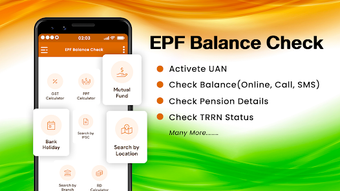

Download EPF Balance Check – EPF balance check, UAN status, PF passbook, EPFO online services, PF account details, Indian PF services, EPF status online, UAN activation, PF claim status, online PF services
Overview
The EPF Balance Check app, developed by Royale Touche Infotech, is a free Android application designed to help Indian users access and manage their Provident Fund (PF) account information efficiently. Tailored for individuals seeking real-time insights into their EPF accounts, the app serves as a digital gateway to key services offered by the Employees' Provident Fund Organisation (EPFO). It enables users to check their PF balance, view e-passbook statements, monitor claim requests, verify or correct personal details, and activate their UAN—all through a streamlined mobile interface.
Targeted primarily at salaried employees and professionals across India, the app is especially beneficial for those with limited internet bandwidth or inconsistent connectivity. By compressing data and optimizing performance, it ensures usability even under low-speed network conditions. The application simplifies access to official EPFO services, reducing the need to navigate complex web portals directly. Real-world usage scenarios include checking PF contributions, tracking claim processing status, and updating member details without visiting a physical office.
As a third-party tool, the app does not replace the official EPFO portal but enhances accessibility. The developer has not provided additional details about the company’s background beyond the name. The app is available exclusively on the Google Play Store, ensuring a secure distribution channel for users.
Key Features & Capabilities
- EPF Balance Check: Instantly view the current balance in your PF account, including contributions from employer and employee, and interest accrued.
- UAN Status & Activation: Check the activation status of your Universal Account Number (UAN) and initiate the activation process if required.
- e-Passbook Access: Retrieve and view your digital passbook with transaction history, including monthly contributions and withdrawals.
- Claim Status Tracking: Monitor the status of any active or submitted PF claims, including withdrawal and transfer requests.
- Member Detail Verification: Review and correct personal information such as name, bank account, and mobile number linked to your PF account.
- Online Form Downloads: Access and download official PF-related forms for various purposes, including loan applications and withdrawal requests.
- Low-Bandwidth Optimization: Data compression ensures smooth performance even on slow internet connections, enhancing accessibility for rural and semi-urban users.
These features collectively support a seamless experience for users managing their retirement savings. For example, an employee relocating to another city can use the app to verify their UAN status and initiate a transfer request without visiting an EPFO office. Similarly, a user preparing for a home loan can download the required PF statement form directly from the app. The integration of multiple services into a single interface improves workflow efficiency and reduces reliance on multiple platforms.
User Interface, Workflow & Performance
The user interface of EPF Balance Check is designed with simplicity and clarity in mind. The layout follows a clean, intuitive structure with clearly labeled sections and minimal navigation complexity. Users can access core functions such as balance check, e-passbook, and UAN status through a centralized dashboard, reducing the number of steps required to perform common tasks.
Navigation is consistent across screens, with a bottom navigation bar providing quick access to key features. The workflow for actions like checking balance or verifying details is straightforward, typically requiring only a few taps. The app appears responsive during routine operations, though exact performance metrics such as CPU or RAM usage were not specified by the developer.
Given its focus on low-bandwidth environments, the app likely employs efficient data handling techniques to minimize load times and reduce data consumption. Stability during extended use has not been detailed, but the app’s lightweight size of 12.5 MB suggests it is optimized for performance on a wide range of Android devices. The developer did not provide additional system requirements or performance benchmarks.
Compatibility & System Requirements
EPF Balance Check is designed for Android devices and is compatible with the Android operating system. The app’s version is listed as 1.0.0, and it has a file size of 12.5 MB, indicating a lightweight installation footprint. This small size supports quick downloads and minimal storage usage, which is advantageous for users with limited device capacity.
While the app is available on the Google Play Store, specific minimum Android version requirements were not provided. As such, compatibility with older or newer Android versions remains unspecified. The developer did not list exact hardware requirements such as RAM or processor specifications. Users are advised to ensure their device meets general Android app standards for optimal performance.
Installation is straightforward through the official Google Play Store, which ensures secure and verified distribution. No additional setup steps or third-party dependencies are mentioned.
Pros and Cons
Pros
- Free to download and use with no in-app purchases
- Optimized for low internet speed, improving accessibility in rural areas
- Comprehensive set of EPFO services in a single app
- Lightweight design (12.5 MB) with minimal storage impact
- Intuitive interface suitable for non-technical users
- Direct access to UAN activation and member detail correction
Cons
- Compatibility with specific Android versions was not disclosed
- Performance details under heavy usage were not provided
- Limited to Android platform; no support for iOS or desktop
- Third-party app; not officially affiliated with EPFO
- Dependent on EPFO’s backend systems for real-time data accuracy
FAQ Section
Is EPF Balance Check available for iOS devices?
The app is currently available only for Android devices and is not supported on iOS platforms.
Is the app safe to use?
As the app is distributed via the Google Play Store, it undergoes security screening. However, users should ensure they are downloading from the official source and avoid third-party sites.
Does the app require internet access?
Yes, internet connectivity is required to access real-time PF account data, including balance, e-passbook, and claim status.
How often are the data updated?
Data accuracy depends on the EPFO’s backend systems. The app retrieves information in real time when connected to the internet.
Can I activate my UAN through this app?
Yes, the app allows users to check their UAN status and initiate the activation process if needed.
Final Thoughts
EPF Balance Check offers a practical, user-friendly solution for Indian employees seeking to manage their Provident Fund accounts on the go. Its focus on low-bandwidth performance, comprehensive feature set, and free access make it a valuable tool for individuals across urban and rural India. While it is not an official EPFO product, its integration of key services—such as UAN activation, e-passbook access, and claim tracking—streamlines the process of financial self-management.
Given its lightweight design and intuitive interface, the app is particularly beneficial for users with older devices or limited internet connectivity. It fills a critical gap in digital access to essential PF services, promoting financial transparency and convenience. For professionals, job seekers, and salaried employees across India, this app represents a reliable companion for monitoring retirement savings.
Download EPF Balance Check now







